
Shopping Cart


InPost Courier PRO – PrestaShop

InPost Courier PRO module for PrestaShop 1.6, 1.7, 8.x and 9.x lets you create courier shipments, download labels and order courier pickups directly from the store back office. Recipient data is taken from the order, so it does not have to be entered again in an external system.
The InPost ShipX API integration supports shipment creation from an order or list, multiple parcels, bulk printing, cash on delivery, insurance, tracking and automatic status updates.
 Compatible with PrestaShop
1.6–9.x
Available languages
 Available language: Polish
 Available language: English
| Parameter | Value |
|---|---|
| Supported PrestaShop versions | 1.6 1.7 8.x 9.x |
| Available languages |
Available language: Polish
Available language: English
|
| Add-on delivery | Automatic |
| Installation difficulty | Easy |
| Back-office shipment creation | Create shipments from an order or a dedicated list. |
| Labels and pickups | Bulk printing, courier pickup orders and manifests. |
| Multiple parcels and tracking | Complete shipment and status handling. |
InPost Courier PRO module
InPost Courier PRO connects store orders with the InPost ShipX API. Recipient data, parcel parameters, additional services, labels and tracking are handled next to the order, eliminating manual data entry in an external panel.
The module is designed for stores using InPost courier delivery that want to shorten daily fulfilment. The shipment form uses order data and lets staff review or edit it before dispatch. Parcel size and weight, content, reference, dispatch method and available additional services can all be configured.
The solution supports PrestaShop 1.6, 1.7, 8.x and 9.x. It works for individual orders and larger batches prepared from a dedicated shipment list.
Key shipment settings and operations remain inside the PrestaShop back office.
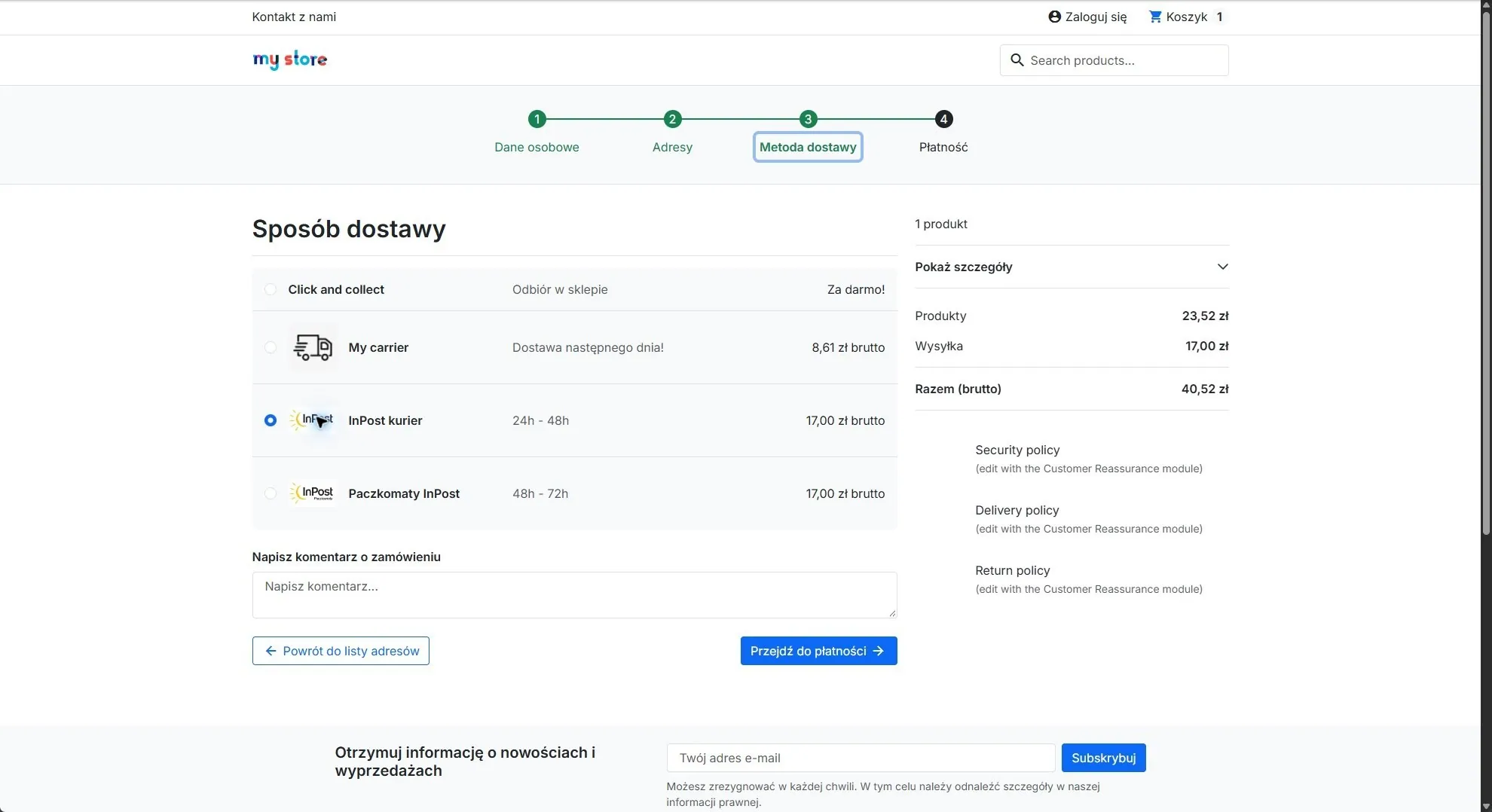
Checkout
The customer selects the configured courier service without leaving checkout and sees its name, estimated delivery time and price.

Configuration
ShipX credentials, organization and sender details, and parcel settings are configured in the module. Default values reduce repetitive work for every order.
For larger order volumes, shipments can be prepared from a list and labels downloaded in one printout. The module can change the order status after the waybill is generated and periodically check delivery status. Shipment history, waybill number and tracking remain linked to the correct order.
The module covers the full address-delivery process: the customer selects courier delivery, the order stores recipient data, and staff prepare the parcel and label in PrestaShop. Shipment number, tracking and statuses remain linked to the correct order.
The InPost Courier carrier appears according to zone, customer group, price or weight range and selected payment.
Name, company, address, phone and e-mail come from the order and can be reviewed or corrected before sending them to ShipX.
Choose a standard parcel or custom dimensions and weight, then set contents, reference, MPK and supported extra services.
Create several shipments for one order. Each receives its own number and label without duplicating the order.
Download a label from the order or in bulk. For supported services, request courier pickup and prepare the available handover document.
The shipment number and tracking link stay with the order. CRON can automatically update the configured statuses.
For one order, staff can review every field directly on its page. For regular fulfilment, the dedicated list supports filtering, shipment creation for selected orders and combined label output.
The module supports COD shipments and insurance. Depending on the service, pickup method and InPost contract, supported SMS or e-mail notifications and ROD document return may also be available. Actual availability follows the services active on the connected ShipX account.
Important: shipment prices, additional services, courier pickup and document requirements follow the agreement with InPost.
Choose this product for address-based courier delivery, custom parcel dimensions and courier pickup requests. If customers should select an InPost locker or pickup point at checkout, choose InPost Parcel Lockers PRO. Browse all InPost modules for PrestaShop.
See the complete InPost Courier PRO guide. For a custom shipping workflow, contact us before purchase.
After installation, connect the module to your InPost ShipX account, enter sender details and configure default shipment parameters. Before going live, create a test shipment and verify the label and courier pickup order.
Choose the module option. If you need implementation support, add installation when ordering.
See what changed in each release of the module.
No matching questions found.
Prepare a shipment from its order page or the dedicated list. Recipient details are taken from the order; review and correct them before creating the shipment.
The module settings contain the ShipX token, organisation and sender details, and default parcel parameters. Match size, weight and dispatch method to your shop's usual shipments.
Yes. The published guide describes multiple parcels per order, standard sizes and parcels with custom dimensions. Check the parameters of each parcel you prepare.
Yes. The guide describes separate settings for prepaid and cash-on-delivery shipments. Before dispatch, compare order payment, COD amount and parcel parameters.
Yes. Shipments can be prepared from a list and their labels downloaded as a combined printout. Match label format and type to your printer; the guide lists PDF, ZPL and EPL.
The shipment number and tracking link remain saved at the order. Compare them with the correct shipment and label before passing the information to the customer.
The guide describes automatic updates through a CRON job. Status settings and the schedule require configuration; having a tracking number alone does not mean periodic updates are running.
Yes. Recipient details can be reviewed and edited before the shipment is created.
Yes. The module lets you create multiple shipments, download additional labels and keep them with one order.
Yes. Shipments and documents can be handled from a list, which speeds up fulfilment of larger order volumes.
Yes. CRON tasks update shipments and the module can change order statuses according to your configuration.
The purchase includes the option shown in the product configurator. Installation can be selected as an option or ordered separately.
You might also like

 Compatibility:
1.6–9.x
PrestaShop compatibility
Supported versions: 1.6, 1.7, 8.x, 9.x

 Compatibility:
1.6–9.x
PrestaShop compatibility
Supported versions: 1.6, 1.7, 8.x, 9.x

 Compatibility:
1.6–9.x
PrestaShop compatibility
Supported versions: 1.6, 1.7, 8.x, 9.x

 Compatibility:
1.7–9.x
PrestaShop compatibility
Supported versions: 1.7, 8.x, 9.x
 Compatibility:
1.6–9.x
PrestaShop compatibility
Supported versions: 1.6, 1.7, 8.x, 9.x

 Compatibility:
1.6–9.x
PrestaShop compatibility
Supported versions: 1.6, 1.7, 8.x, 9.x

 Compatibility:
1.6–9.x
PrestaShop compatibility
Supported versions: 1.6, 1.7, 8.x, 9.x

 Compatibility:
1.6–9.x
PrestaShop compatibility
Supported versions: 1.6, 1.7, 8.x, 9.x
